I'm a developer. I spend eight hours a day staring at a code editor, a terminal, and a browser. It is, objectively, not that exciting to look at.
So I built PixelHUD.
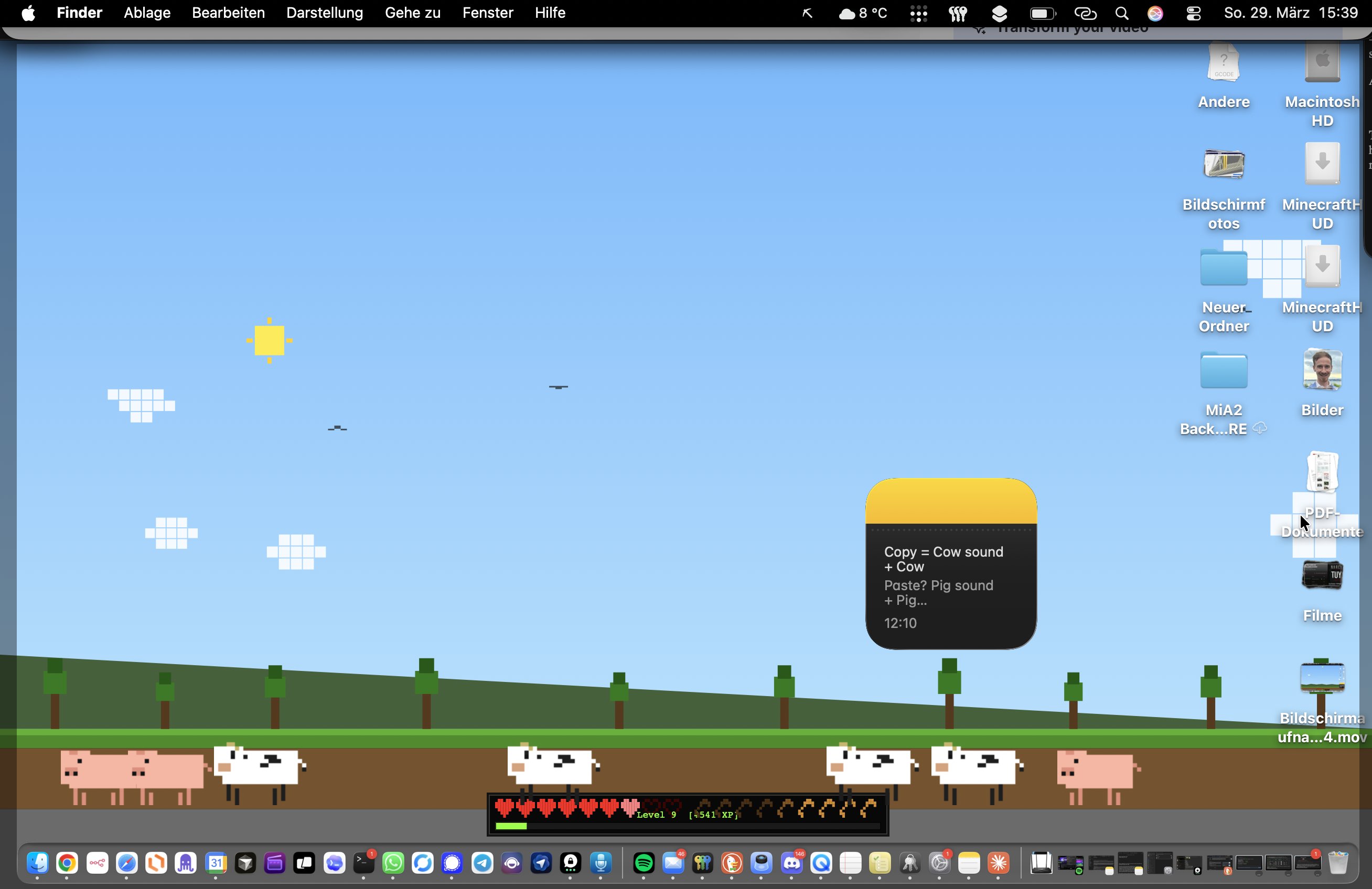
It's a Mac app that overlays a live Minecraft-style HUD on top of everything else on your screen — nine pixelated hearts in the bottom-left, a drumstick hunger bar, a green XP bar that fills as you work, and a kill feed in the top-right corner that announces every app you close. Press Cmd+C and a pixelated cow walks across the bottom of your screen. Press any key and you hear the soft sound of a dirt block being placed.
It sounds ridiculous. It is a little ridiculous. And somehow, it made me a better developer.
The Idea
I've played Minecraft since 2011. There's something uniquely satisfying about the game's HUD — the hearts that show how close to death you are, the hunger bar that rewards you for eating, the XP that accumulates as you collect orbs. Every number means something. Every bar going down creates mild urgency.
I started wondering: what if my Mac behaved like a Minecraft world? What if my battery level was my health bar? What if scrolling social media actually drained something tangible?
That's what PixelHUD is.
How It Works
Hearts = Battery
Nine pixel-perfect Minecraft hearts sit in the bottom-left corner of your screen. Each heart represents roughly 11% of your battery. Drop below 20% and you hear the classic hurt sound. Let it die completely and — well, you lose. Keeping your Mac charged suddenly feels like keeping your character alive.
Hunger Bar = Real Productivity
The hunger bar empties over about six hours — roughly a workday. Three clicks on the drumstick icons and you refill it. But here's the clever bit: scroll YouTube, Instagram, TikTok, Reddit, or Twitter and your hunger drains faster. Stay off social media and you stay fed longer. It turns distraction into a tangible cost you can actually see.
XP Bar = Your Work
Every keystroke and mouse click earns XP. Watch the bar fill. Level up. A sound fires when you do. It resets at midnight. What's your high score for the day?
Kill Feed
Close Chrome and the top-right corner of your screen reads: "Chrome was slain." Close Zoom: "Zoom has fallen." Close Spotify: "Spotify got rekt." It disappears after a few seconds. It's funny every single time, but more importantly, it makes quitting distracting apps feel like a win rather than a loss.
Real Minecraft Sounds on Shortcuts
This is the feature that gets the most comments from people who walk past my desk. Every keyboard shortcut plays a matching Minecraft sound:
- Any key → dirt block place
- Cmd+S → XP orb pickup
- Cmd+C → cow moo (and a cow walks across your screen)
- Cmd+V → pig oink
- Cmd+Z → dog bark
- Force Quit → TNT explosion
The sounds are quiet enough that they don't distract, loud enough that you notice them. After a few days, saving a file feels like collecting an orb.
Why It Actually Helps
I expected PixelHUD to be a novelty. What surprised me was how much it changed my relationship to distraction. When I can see my hunger bar dropping because I opened Twitter, I close Twitter faster. When I can see my XP bar filling because I've been typing for twenty minutes straight, I don't want to break the streak.
Gamification works when the feedback is immediate and visible. The HUD is always there, always updating, always giving you a sense of how your session is going. It makes the abstract (am I being productive today?) into something concrete and immediate.
It also makes the Mac more fun. That's not nothing.
PixelHUD is not affiliated with Mojang or Microsoft. Minecraft is a registered trademark of Mojang Studios. Download at pixelhud.eliaspfeffer.de.